Bracket: Vector engineering PDF to DXF
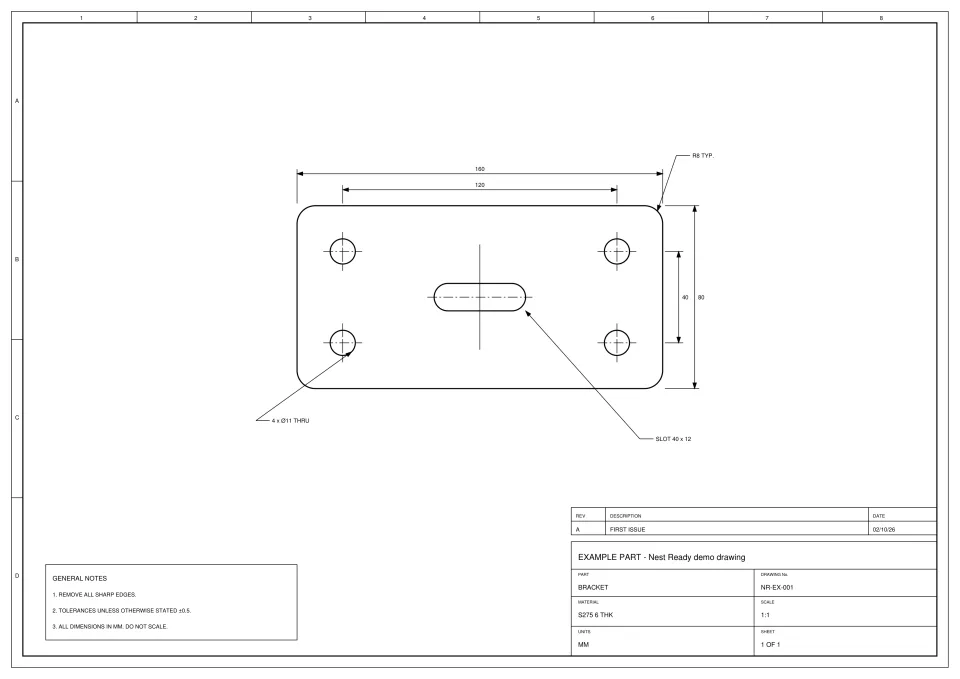
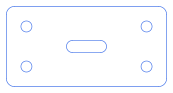
A real Nest Ready conversion of an example drawing made for the purpose. Below are the drawing as uploaded, the DXF Nest Ready produced and the facts of that run, including anything the reviewer had to do.
No card required. Bring your own drawings.
The drawing, and the DXF that came out
What is worth noticing in this example?
This is a vector PDF, the kind CAD exports, so it holds the drawing’s own lines rather than a picture of them.
The DXF is the 160 × 80 outline with its R8 corners, the four Ø11 holes and the 40 × 12 slot, at 1:1. The dimensions, notes, title block and border stayed behind.
Nothing was flagged, so the part was downloaded as it came out.
The same drawing, sent another way: the bracket as a scanned PDF.
What happened in this run?
- Time to ready
- about 15 s from submission to ready
- Features
- outer profile, 4 holes, 1 slot
- Flags
- None
- Review
- None: no flags, downloaded as extracted
The time is from submission to ready, so it includes any wait in the queue. It is this run’s figure, not a promise.
What was kept, and what was left behind?
Kept in the DXF
- Outer profile with R8 corners
- 4 × Ø11 holes
- 40 × 12 slot
Left behind
- Dimensions and extension lines
- Leaders and arrowheads
- Centre lines
- General notes
- Title block and revision table
- Drawing border and zone markings
Check every DXF against the drawing before cutting.
Download the DXF
The file exactly as it was downloaded from Nest Ready.
Where to go next
Convert your next engineering drawing to DXF.
Upload a PDF, scanned drawing or drawing image and see the part geometry Nest Ready can extract.