Bracket
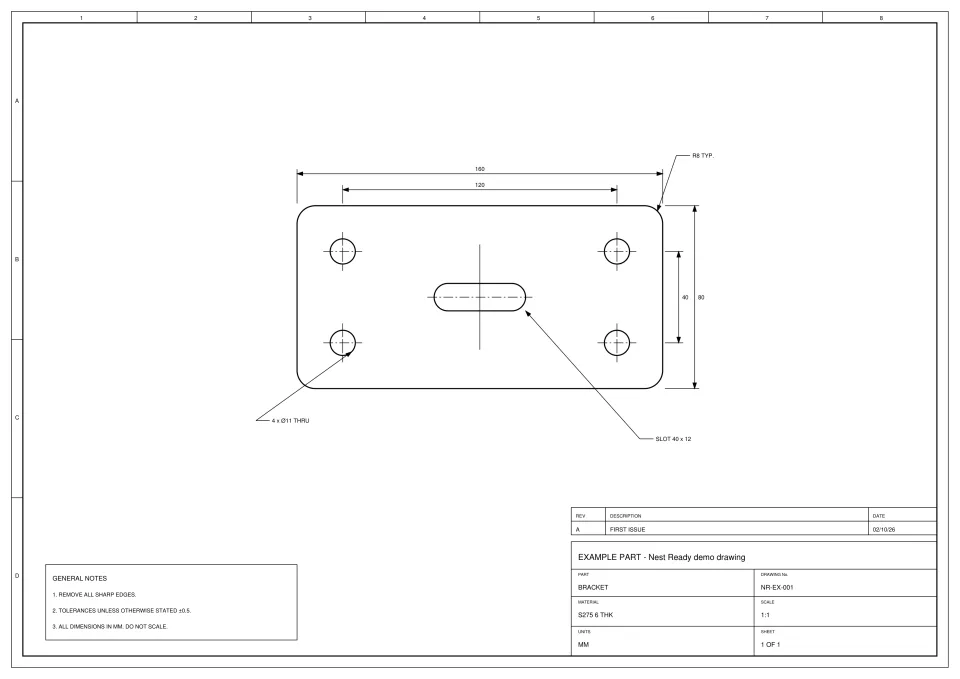
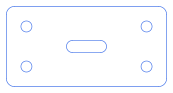
- Time
- about 15 s from submission to ready
- Features
- outer profile, 4 holes, 1 slot
- Flags
- None
- Review
- None: no flags, downloaded as extracted
Nest Ready converts an engineering PDF into DXF geometry of the part itself: the outer profile, holes, slots and cut-outs. The dimensions, notes, border and title block stay behind, so you start in your CAD/CAM or nesting software with the part, not a page of linework to clean up. Anything uncertain is flagged for review.
No card required. Bring your own drawings.
Because it converts the page, not the part. Every line on the sheet becomes a CAD entity, whether it’s the profile, a dimension line or the title block border.
A customer sends an engineering PDF, but your CAD/CAM or nesting software needs the part’s geometry. With a page converter, someone still has to open the result, find the part, delete the dimensions, text, centre lines and border, join up what’s left and check it against the drawing. On a busy day that’s the same clean-up, part after part.
Nest Ready does the separating for you. It works out which closed outlines are parts and exports only those, in around 15 seconds per part on average.
The geometry you need to make the part, and none of the drawing around it.
Check every DXF against the drawing before cutting.
A page converter and Nest Ready start from the same PDF and hand you very different files.
| Compared on | Page converter | Nest Ready |
|---|---|---|
| What comes across | Everything on the page | The part: outer profile, holes, slots and cut-outs |
| Dimensions, text and centre lines | Converted into lines and text you then delete | Left behind |
| Border and title block | Converted along with the part | Left behind |
| Layers | Whatever the PDF happened to use | OUTER for the profile, INNER for holes and cut-outs |
| A scanned PDF | Nothing to convert: a scan has no lines inside it | Traced from the pixels, with its scale taken from the written dimensions |
| Checking | Up to you, line by line | Anything uncertain is flagged; you still check every DXF before cutting |
A PDF exported from CAD stores the drawing as lines, arcs and text. A scanned PDF stores a picture of the drawing.
When a drawing is exported from CAD, its geometry travels inside the PDF as drawing data, and Nest Ready reads it directly. When a paper drawing is scanned, the PDF holds pixels: there are no lines inside to read, so a converter that only reads vector data has nothing to convert.
You don’t need to sort them first. Nest Ready checks each page and traces scanned pages from the pixels instead. How scanned PDFs are converted.
Five steps, from the customer’s PDF to geometry in your own workflow.
Drop in the customer’s drawing, or a batch of up to 50 files. Each file can be up to 25 MB.
Nest Ready reads the lines and arcs in the PDF, picks out the parts and leaves the drawing furniture behind.
Each part is shown beside the drawing with an overlay and measurements. Anything uncertain is flagged for review.
One DXF per part, at true size in millimetres, with the outer profile and internal features on their own layers.
Bring the DXF into your CAD/CAM or nesting software as you would any other. Check every DXF against the drawing before cutting.
Example drawings converted by Nest Ready: the drawing, the DXF it produced and the facts of the run.
A plain R12 DXF of the part, for you to check against the drawing before it’s cut.
OUTER; holes and cut-outs on layer INNER.Anything uncertain is flagged for review. Parts nobody has reviewed still download; when a drawing has several parts, the README in the zip marks them NEEDS REVIEW. Check every DXF against the drawing before cutting. Nest Ready produces geometry only: toolpaths, cutting parameters, machine code and nesting stay in your own software.
What to know before you send in your first drawing.
Yes. It picks out each part on the sheet and gives each its own DXF. You pay per part downloaded, not per page.
The DXF is always at true size in millimetres. Inch drawings are converted.
Yes. Each page is read on its own, so a set that mixes CAD-exported pages with scanned ones is handled page by page.
Each file can be up to 25 MB, and you can upload up to 50 files in one batch. Nest Ready accepts PDF, JPG and PNG.
No. A part from a vector PDF counts as one part. A part from a scan, photo or sketch counts as 5, because it takes a vision model to read and more checking.
Bring the drawing. Leave with the part.
We'd like to use Google Analytics cookies to see which pages help people find Nest Ready. Nothing is set unless you accept. Cookie policy