Bracket
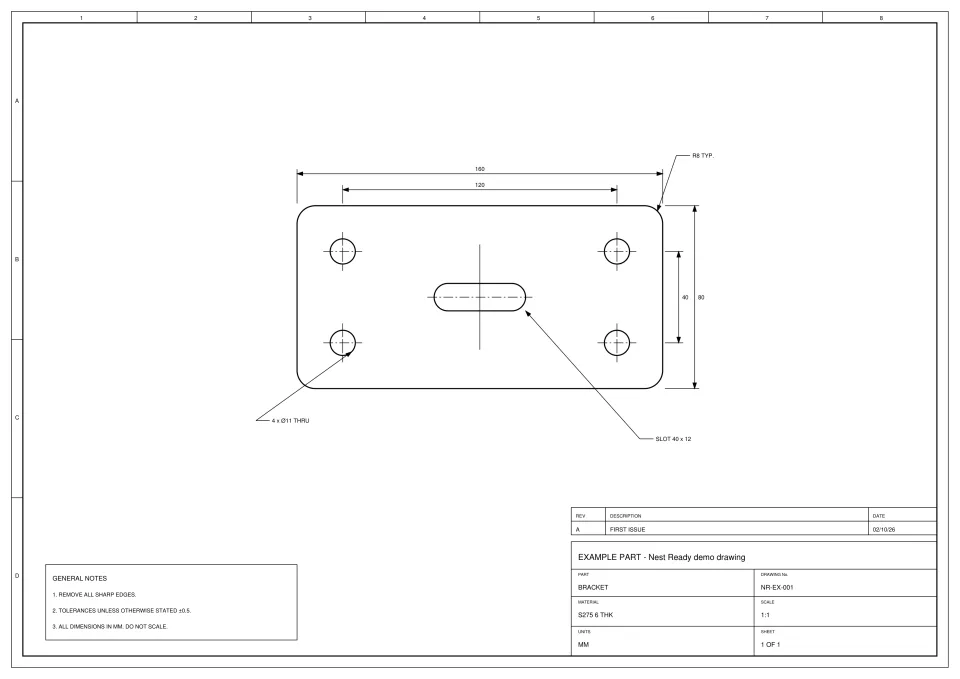
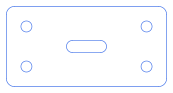
- Time
- about 15 s from submission to ready
- Features
- outer profile, 4 holes, 1 slot
- Flags
- None
- Review
- None: no flags, downloaded as extracted
Laser cutting jobs arrive as drawings, not cutting files. Nest Ready takes the customer’s PDF, scan or photo of a drawing and gives you DXF geometry of each part, ready to check and bring into your CAD/CAM and nesting software. It doesn’t program the machine: toolpaths, cutting parameters and nesting stay in the software you already use.
No card required. Bring your own drawings.
Before a part can be nested, someone has to turn the customer’s drawing into geometry. By hand, that is a string of small jobs, for every part.
Nest Ready takes on the extracting and cleaning, in around 15 seconds per part on average, and leaves the checking with you. To see what that’s worth at your volume, put your own numbers into the savings calculator.
It sits between the RFQ and your CAD/CAM: drawing in, part geometry out.
With a PDF, a scan or a photo of the customer’s drawing, and rarely a DXF you can use as it is.
Up to 50 files in one batch, as PDF, JPG or PNG. Each page is read on its own.
The outer profile and its holes, slots and cut-outs, with the dimensions, notes and title block left behind.
Each part sits beside the drawing for review. Anything uncertain is flagged, and parts from scans and photos are flagged by default.
One per part, at true size in millimetres, with the profile on layer OUTER and internal features on INNER.
Import into your CAD/CAM and nesting software. Check every DXF against the drawing before cutting.
Engineering PDFs exported from CAD, scanned PDFs, JPG and PNG images, and photos of drawings.
Everything after the geometry. Nest Ready hands over the part; how it is cut is still your call.
| Task | Nest Ready | Your software and team |
|---|---|---|
| Find the part on the customer’s drawing | Nest Ready | Not done |
| Leave dimensions, notes and title block behind | Nest Ready | Not done |
| Flag anything uncertain | Nest Ready | Not done |
| Check every DXF against the drawing | You, in review | You |
| Lead-ins, kerf and toolpaths | Not done | Your CAD/CAM software |
| Cutting parameters and machine code | Not done | Your CAD/CAM software |
| Nesting parts on the sheet | Not done | Your nesting software |
Example drawings converted by Nest Ready: the drawing, the DXF it produced and the facts of the run.
What to know before you send in your first drawing.
No. It produces the part geometry as DXF. Nesting, toolpaths, cutting parameters and machine code stay in the CAD/CAM and nesting software you already use.
It is a plain DXF R12 with LINE, ARC and CIRCLE entities only, contours that join exactly, and the profile and internal features on separate layers. Check every DXF against the drawing before cutting.
Yes. Upload up to 50 files in one batch, up to 25 MB each. Each part on each page is extracted on its own.
Nest Ready works from photos of drawings: it squares the photo up and takes the scale from the dimensions written on it. A part from a photo counts as 5 parts. It works from drawings, not photos of physical parts.
Bring the drawing. Leave with the part.
We'd like to use Google Analytics cookies to see which pages help people find Nest Ready. Nothing is set unless you accept. Cookie policy