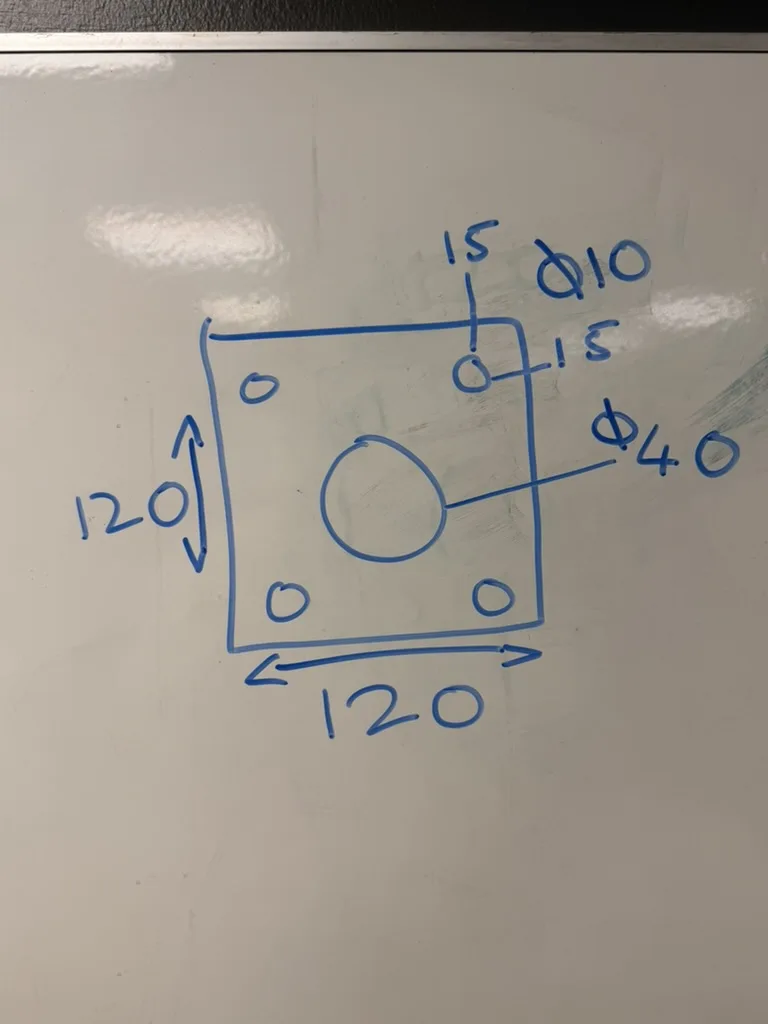
Whiteboard sketch
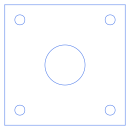
- Geometry
- outer profile, 5 holes
- Flags
- This came from a scan or photo; Something was not written on the drawing
- Review
- Checked and accepted in review
Take a phone photo of a hand sketch, a printed drawing or the part itself, and get back a DXF of the part. Nest Ready builds the profile and holes from the sizes written on it, not from the pixels, so a sketch that isn’t drawn to scale still comes out the size it says. Anything it had to estimate is flagged for review.
No card required. Bring your own drawings.
Because the pixels don’t know how big the part is. The numbers written on it do.
A photo is taken at an angle, of paper or a whiteboard that may not be flat, and a sketch is rarely drawn to scale. An image tracer turns the pixels into lines, so it copies all of that: the lean of the camera, the wobble of the pen, and a size that means nothing until someone measures it. It traces the dimensions, arrows and handwriting too, as if they were part of the part.
Nest Ready works the other way round. It reads what the sketch says, such as 120 wide with Ø10 holes 15 in from each edge, and draws the part from those numbers. The sketch shows what goes where; the numbers say how big.
A phone photo of a sketch on a whiteboard, taken at an angle and not drawn to scale, beside the DXF Nest Ready made from it and the facts of the run.
It reads the sizes, builds the part from them and tells you what it had to estimate.
Of the sketch, the drawing or the part, with its sizes in shot. Upload it as a JPG or PNG; location and camera details are stripped in your browser first.
Nest Ready reads the sizes written on the photo and builds the profile and holes from them, in millimetres. The lines are never traced to size.
A size that isn’t written anywhere is estimated from the proportions, and the part is flagged to say so.
Parts from photos are held for review by default. If something was read wrongly, re-run the drawing with a note saying what needs changing.
At true size in millimetres, ready for your CAD/CAM or nesting software once you’ve checked it against the photo.
The more the photo tells Nest Ready, the less it has to estimate.
Every size on the photo is one less thing to guess. Sizes that are written are used as written; anything that isn’t is estimated from the proportions and flagged, so you know exactly what to check. A clear photo of a sketch or drawing with its sizes on it needs the least checking.
The same goes for a photo of the part itself: it works, and it works best with the sizes shown alongside it.
In review, the photo sits beside the part with its measurements. Parts from photos are held for review by default.
You can accept a part, reject it with a reason, or re-run the drawing with a note saying what needs changing. Parts nobody has reviewed still download; when a drawing has several parts, the README in the zip marks them NEEDS REVIEW. Check every DXF against the drawing before cutting. More on review.
Plenty of parts are first described on the back of an envelope, a whiteboard or a phone.
A customer sends a photo of a sketch with the sizes scribbled on. A fitter draws a bracket on the whiteboard and takes a picture. A customer photographs the worn part they want remade and notes its sizes. Each one has to become geometry before it can be quoted, programmed or cut, and that has usually meant drawing it up in CAD first. Nest Ready does that drawing for you.
If you quote from customer drawings, see drawing to DXF for estimating and quoting.
A photo can only give back what it shows. Nest Ready tells you what it had to fill in.
What to know before you send in your first drawing.
No. The sizes come from the numbers written on it, so a rough sketch comes out at the size it says. The drawing only has to show what goes where.
Yes. The same rule applies: the part is built from the sizes the photo shows, and anything it doesn’t show is estimated and flagged. The more sizes it carries, the less there is to check.
A missing size is estimated from the proportions and the part is flagged “Something was not written on the drawing”, so you know what to check. If a size was misread, re-run the drawing with a note saying what it should be.
JPG or PNG, up to 25 MB each. HEIC isn’t accepted: save the photo as a JPG first. Location and camera details are removed in your browser before the photo is uploaded.
It takes a vision model to read and more checking than a vector PDF, so a part from a photo counts as 5 parts against your allowance. It’s charged when you first download it, and not at all if you reject it.
Upload a PDF, scanned drawing or drawing image and see the part geometry Nest Ready can extract.
We'd like to use Google Analytics and Google Ads cookies to see which pages help people find Nest Ready and to measure our adverts and show them to people who have visited. Nothing is set unless you accept. Cookie policy