Whiteboard sketch: Phone photo of a hand sketch to DXF
A real Nest Ready conversion of an example drawing made for the purpose. Below are the drawing as uploaded, the DXF Nest Ready produced and the facts of that run, including anything the reviewer had to do.
No card required. Bring your own drawings.
The drawing, and the DXF that came out
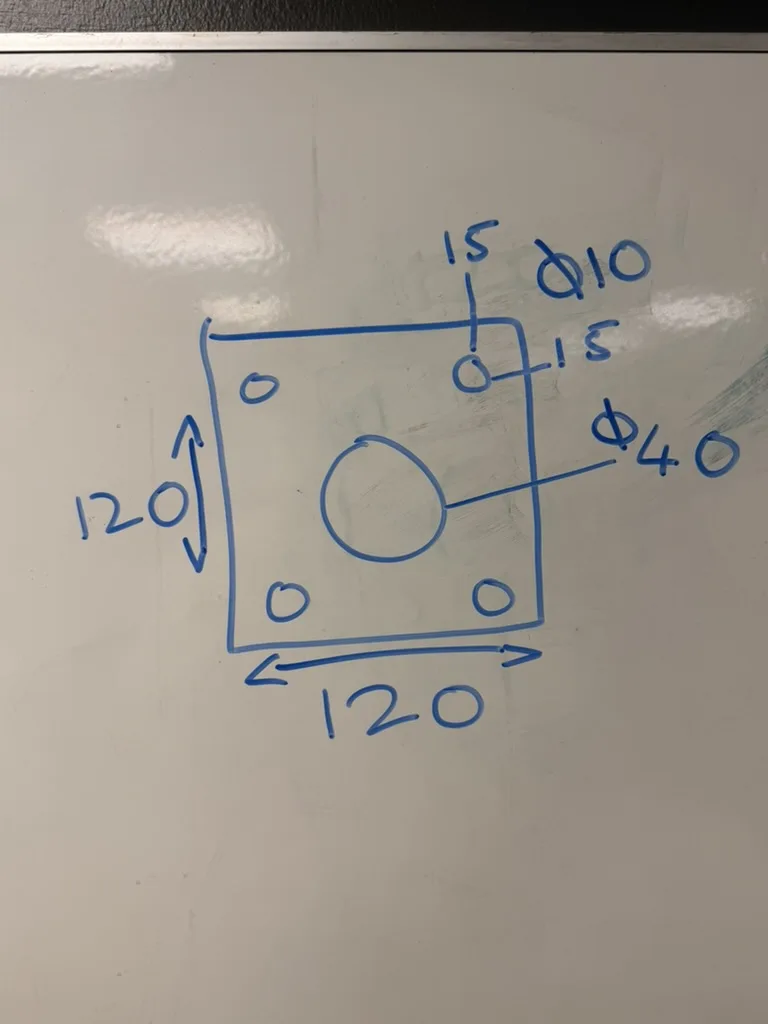
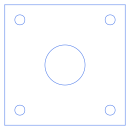
What is worth noticing in this example?
The sketch isn’t drawn to scale, and the photo is taken at an angle. The DXF is 120 × 120, with the holes at the sizes and positions written on the sketch.
It carries two flags: it came from a photo, and something on the part wasn’t written on the sketch and was estimated. It was checked and accepted in review.
What happened in this run?
- Features
- outer profile, 5 holes
- Flags
- This came from a scan or photo; Something was not written on the drawing
- Review
- Checked and accepted in review
What was kept, and what was left behind?
Kept in the DXF
- 120 × 120 outer profile
- 4 × Ø10 holes, 15 from each edge
- Ø40 centre hole
Left behind
- Dimensions and arrows
- Leader lines
- The whiteboard around the sketch
Check every DXF against the drawing before cutting.
Download the DXF
The file exactly as it was downloaded from Nest Ready.
Where to go next
Convert your next engineering drawing to DXF.
Upload a PDF, scanned drawing or drawing image and see the part geometry Nest Ready can extract.