Base plate: Scanned PDF to DXF
A real Nest Ready conversion of an example drawing made for the purpose. Below are the drawing as uploaded, the DXF Nest Ready produced and the facts of that run, including anything the reviewer had to do.
No card required. Bring your own drawings.
The drawing, and the DXF that came out
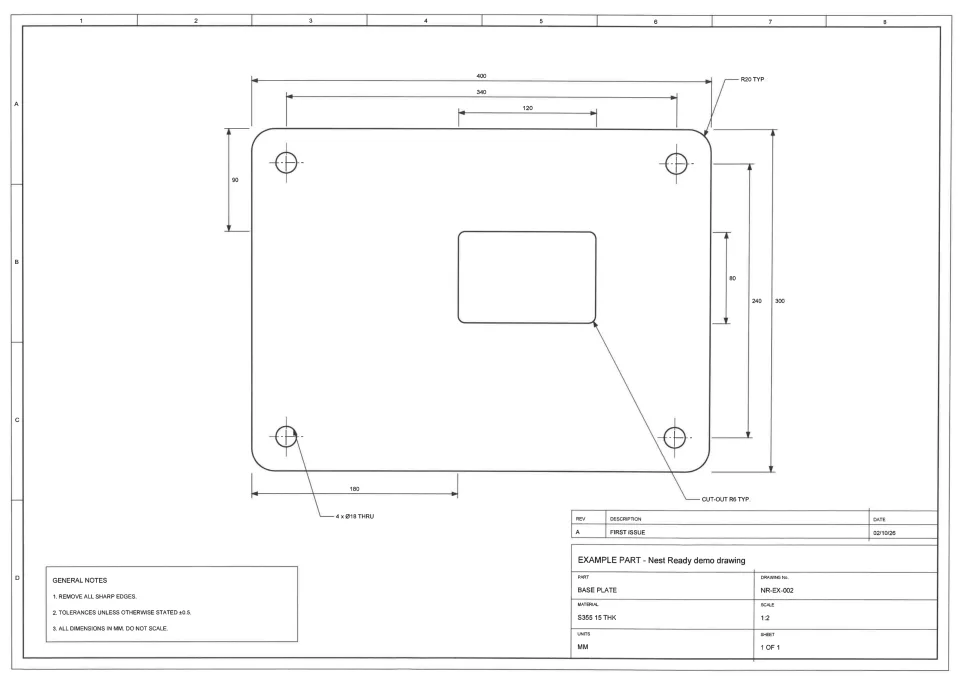
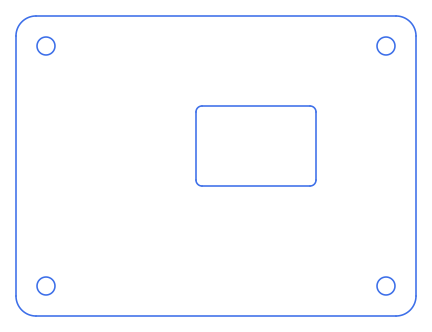
What is worth noticing in this example?
The sheet is drawn at 1:2. The DXF is at full size, 400 × 300, because the part is built from the dimensions written on the drawing, not measured off the page.
The cut-out sits where its 180 and 90 dimensions put it, with its R6 corners, and the four Ø18 holes are on their 340 × 240 pattern.
Its one flag is the one every scanned part carries: it was read from a scan, so check it against the drawing before cutting.
This sheet and the bracket were the two pages of one scanned PDF, read in one job, so the time shown is for both pages.
What happened in this run?
- Time to ready
- about 35 s from submission to ready, for both pages of the scan, read as one job
- Features
- outer profile, 4 holes, 1 cut-out
- Flags
- This came from a scan or photo
- Review
- Checked and accepted in review, with no corrections
The time is from submission to ready, so it includes any wait in the queue. It is this run’s figure, not a promise.
What was kept, and what was left behind?
Kept in the DXF
- 400 × 300 outer profile with R20 corners
- 4 × Ø18 holes
- 120 × 80 cut-out with R6 corners
Left behind
- Dimensions and extension lines
- Leaders and arrowheads
- Centre lines
- General notes
- Title block and revision table
- Drawing border and zone markings
Check every DXF against the drawing before cutting.
Download the DXF
The file exactly as it was downloaded from Nest Ready.
Where to go next
Convert your next engineering drawing to DXF.
Upload a PDF, scanned drawing or drawing image and see the part geometry Nest Ready can extract.